
Pix User Manual

  • Welcome to Pix
  • Installation
  • User Interface
  • Toolbar overview
  • Toolbar commands
    • Selection
      • Pick
      • Measure
    • Draw
      • Line
      • Parallel line
      • Perpendicular line
      • Arc
      • 2-Point arc
      • 3-Point arc
      • Tangent-Point arc
      • Point
    • Draw shapes
      • Circle
      • 2-Point circle
      • 3-Point circle
      • Rectangle
      • Center-Point rectangle
      • Inscribed polygon
      • Circumscribed polygon
      • Edge polygon
    • Edit edges
      • Fillet
      • Chamfer
      • Inside fillet
      • Corner step
      • Edge recess
      • Edge U-Cut
      • Edge V-Cut
      • Key slot
    • Modify
      • Move
      • Rotate
      • Scale
      • Mirror
      • Rectangular array
      • Polar array
      • Trim
      • Extend
    • Dimensions
      • Linear Dimension
      • Baseline Dimension
      • Continue Dimension
      • Angle Dimension
      • 3-Point Angle Dimension
      • Radius Dimension
      • Diameter Dimension
      • Callout Dimension
      • Segment Dimension
    • Cleanup
      • Join
      • Decurve
      • Remove Small Segments
      • Mark Open Polylines
      • Highlight Overlaps
      • Mark Non-Tangent Corners
      • Mark Large Radius
    • Setup
      • Layer Setup
      • Shift Origin
  • Demo Videos
Toolbar commands
/
Modify

Modify

The Modify section allows you to modify existing shapes in Pix.

The following tools are available in the Modify section:
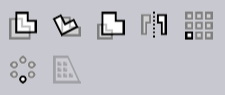
Modify Tools
  • Move Tool

  • Rotate Tool

  • Scale Tool

  • Mirror Tool

  • Rectangular Array Tool

  • Polar Array Tool

Copy while modifying entities or segments

In Pix, you can create copies of selected drawing entities or segments while using any of the Modify tools. To do this, hold down the Ctrl key while specifying the second point (or end point) of the modification operation.

This will create a copy of the selected drawing entities or segments at the new location, while keeping the original entities or segments intact.

Contents

  • Copy while modifying entities or segments
Key slot Move

      Copyright © 2025 TRUMPF Metamation. All rights reserved.

    Compiled by Bento