
Pix User Manual

  • Welcome to Pix
  • Installation
  • User Interface
  • Toolbar overview
  • Toolbar commands
    • Selection
      • Pick
      • Measure
    • Draw
      • Line
      • Parallel line
      • Perpendicular line
      • Arc
      • 2-Point arc
      • 3-Point arc
      • Tangent-Point arc
      • Point
    • Draw shapes
      • Circle
      • 2-Point circle
      • 3-Point circle
      • Rectangle
      • Center-Point rectangle
      • Inscribed polygon
      • Circumscribed polygon
      • Edge polygon
    • Edit edges
      • Fillet
      • Chamfer
      • Inside fillet
      • Corner step
      • Edge recess
      • Edge U-Cut
      • Edge V-Cut
      • Key slot
    • Modify
      • Move
      • Rotate
      • Scale
      • Mirror
      • Rectangular array
      • Polar array
      • Trim
      • Extend
    • Dimensions
      • Linear Dimension
      • Baseline Dimension
      • Continue Dimension
      • Angle Dimension
      • 3-Point Angle Dimension
      • Radius Dimension
      • Diameter Dimension
      • Callout Dimension
      • Segment Dimension
    • Cleanup
      • Join
      • Decurve
      • Remove Small Segments
      • Mark Open Polylines
      • Highlight Overlaps
      • Mark Non-Tangent Corners
      • Mark Large Radius
    • Setup
      • Layer Setup
      • Shift Origin
  • Demo Videos
Toolbar commands
/
Draw

Draw

The Draw section allow you to create lines, arcs, shapes, and other graphical elements.

The following tools are available in the Draw section:
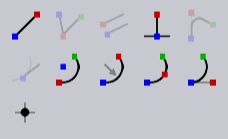
Draw Tools
  • Line Tool

  • Arc Tool

  • 2-Point Arc Tool

  • 3-Point Arc Tool

  • Tangent Arc Tool

  • Point Tool

Repeat last command

You can repeat the last used command by holding the Ctrl key and clicking the mouse button. This option is useful for drawing multiple similar elements without having to reselect the tool each time.

Contents

  • Repeat last command
Measure Line

      Copyright © 2025 TRUMPF Metamation. All rights reserved.

    Compiled by Bento